
Shared mailbox in Outlook app
A shared mailbox can be access through your YWAM account, meaning that there is no "login" for the shared mailbox, you only have to open it up. This process is explained below for the different devices circumstances
When you get access to a shared email we give access through your personal ywam account.
If you are in the Outlook app on either phone or pc, you can access it automatically by scrolling down on the left side
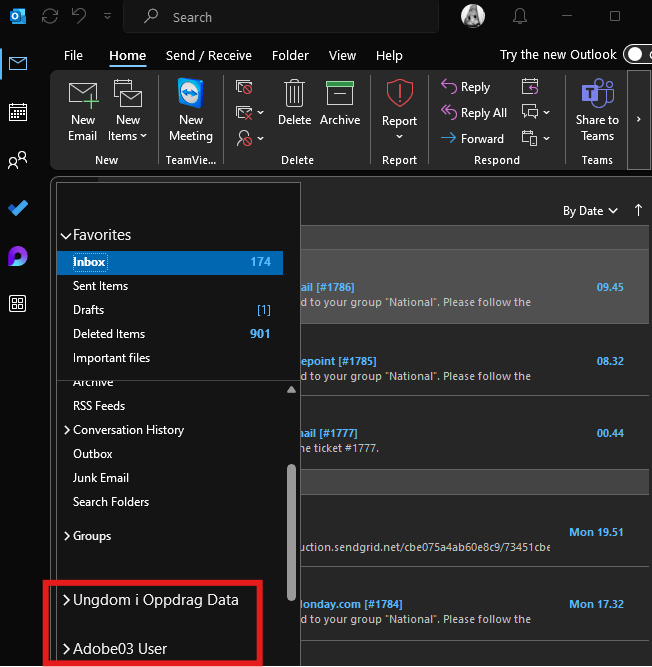
Now you have successfully gained access to your shared mailbox.
Access to shared mailbox in browser
If you want to access your mailbox in a browser, you have to go to outlook.office.com and then click your icon in the top-right corner and click "open another mailbox".
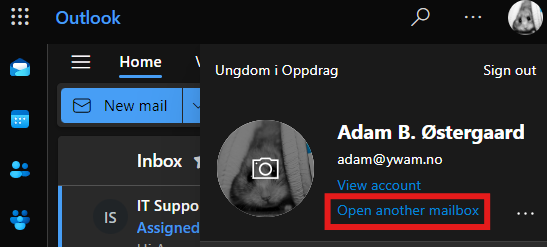
From here you write the mail you want to access:
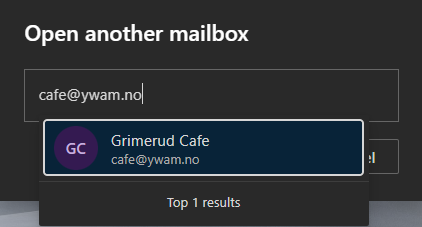
A tip is to save the link so that you can open it directly later. It is of the format "https://outlook.microsoft.com/mail/shared.mailboxname@uioborgen.no"
Shared mailbox with Outlook app on phone
Click your icon in the top-left corner and the big "+" to add a shared mailbox

Here you click "Add a shared mailbox"
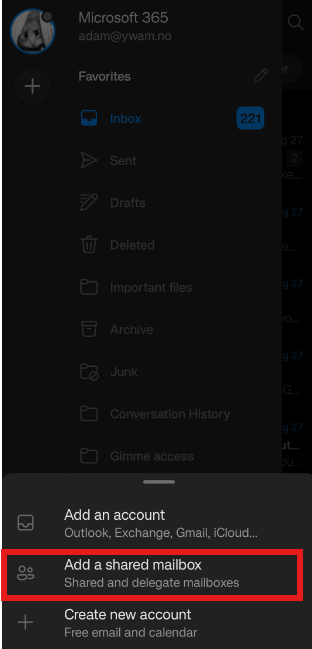
Here you write in the full email name of the shared mailbox you want access to.

If accepted, you will have it show as a second "tab" on the left after you click your icon in the top-left corner.
If this does not work, even tho you have been given access, you have to clear your cache, which is linked further down in this guide.
If this is not working you can follow the steps here and add the shared mailbox manually: https://support.microsoft.com/en-us/office/open-and-use-a-shared-mailbox-in-outlook-d94a8e9e-21f1-4240-808b-de9c9c088afd
If you only use the browser see the steps here: https://support.microsoft.com/en-us/office/open-and-use-a-shared-mailbox-in-outlook-on-the-web-98b5a90d-4e38-415d-a030-f09a4cd28207
If you have to reset your cache, see the steps here: ywam.freshdesk.com/resetting-cache
A trick on the browser is to write in the mailbox address like this: https://outlook.office.com/mail/emailaddresshere@ywam.no